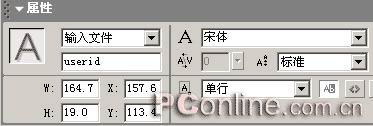
图03
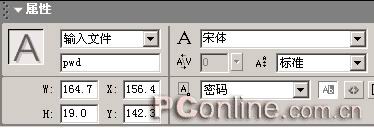
图04
2、创建另外两个关键帧,分别命名为“true”和“false”,并分别显示“登陆成功”和“登陆失败”字样。
3、在Button的ActionScript中增加下面的语句,注意更改其中的ip地址。
on (release) {
loadVariables("http://192.168.1.32/guest.htm?userid="
add eval(_root.userid) add "&pwd="
add eval(_root.pwd),this, "GET");
now = new Date();
begintime = now.getSeconds();
while(true) {
endt = new Date();
endtime = endt.getSeconds();
if (endt - now > 2)
{
_root.gotoAndPlay(eval(login));
}
}
}
4、在Sql Server数据库(数据库的类型不重要,改一改连接串就可以的)中,建立一张名为“userinfo”的表,其中有“Userid”和“Password”两个字段。
5、建立一个guest.htm文件,文件内容为
<%
username = Request(“userid”)
password = Request(“pwd”)
set conn=Server.CreateObject("ADODB.Connection")
conn.open application("Driver={SQL Server};SERVER=192.168.1.32;DATABASE=test;UID=zengyu;PASSWORD=123")
set rstemp=Server.CreateObject("ADODB.Recordset")
sqltemp1="select * from UserInfo where
userid='"&username&"' and
password='"&strpassword&"'"
rstemp.open sqltemp1,conn, 1, 1
if not(rstemp.bof and rstemp.eof) then
Response.Write (“login=true”)
Else
Response.Write (“login=false”)
end if
%>
6、将Flash文件和Asp文件部署到IIS服务器中,然后打开Flash文件,输入登陆信息就可以看到实例的效果了。
|


