| 4、接下来我们就要刻录Windows XP安装光盘了。这里以Nero Burning
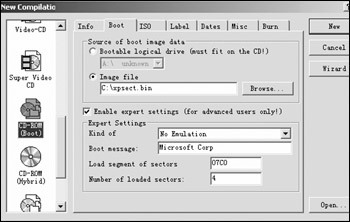
Rom为例,启动Nero Burning Rom,在“New Compilation”的光盘类型中选择“CD-ROM(Boot)”,也就是可启动光盘。首先来看看在“Boot”选项卡中的设置:在“Source
of boot image data”中选择“Image File”,然后输入“C:\xpsect.bin”,在“Enable expert
setting(for advanced users only!)”前打上勾,然后在“Expert Settings”的“Kind of”中选择“No
Emulation”,把“Number of loaded sectors”的数值改为4。
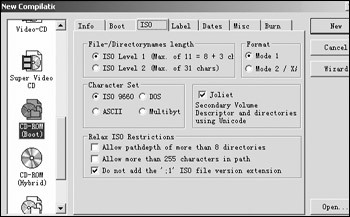
5、接下来我们看“ISO”选项卡的设置。在“File-/Directorynames length”中选择“ISO Level 1”,在“Relax
ISO Restiction”中选择“Don't add the ':1' ISO file version extension”。
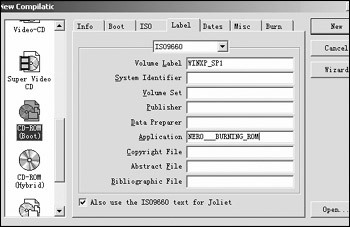
6、然后我们看“Label”选项卡的设置,“Volume Label”中输入的信息最好能体现出这张光盘是集成了SP1的Windows XP安装光盘。
 |


