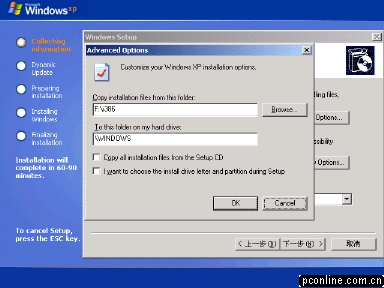
6、第5步图中的"Advanced Options"选项:
"Copy installation files from this folder"是安装的源目录,
"To this folder on my hard
drive"是安装的目标目录,注意目标目录没有带驱动器号。如果想自己选安装在哪个驱动器号上,勾选下面的"I want to choose the install
drive letter and partition during Setup"。
"Copy all installation files from the Setup CD"“Copy
…………”是把安装盘上的文件拷贝到硬盘上(多拷贝一次)。用光盘安装时它一般不会把安装源文件整个拷贝到硬盘,而是在安装时建立拷贝的文件列表,按列表拷贝。
"I want to choose the install drive letter and partition during Setup"用于改变WINXP安装目录。
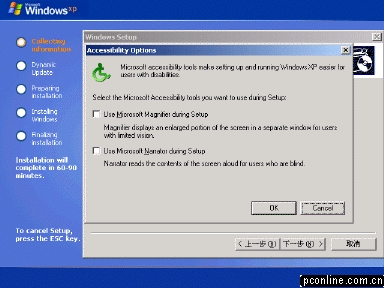
7、第5步图中"Accessibility Options"选项,即辅助选项(残疾人专用)。
勾选"Use Microsoft Magnifier during Setup"是"使用微软放大镜",字体会显示得很大。
勾选"Use Microsoft Narrator during Setup"是"使用微软讲述者",每步都有英文的语音提示,很清晰。
|


